By the end of this lesson
You can read your AI visibility score, tell a real change from noise, and find the country and the AI where you're weakest.
A buyer asks ChatGPT for the best oud perfume delivered to Riyadh by Thursday. The AI can recommend your store near the top, name you further down, or leave you out. Across all your questions and all the AIs, that happens hundreds of times a month. The AI visibility score turns it into one number from 0 to 100, so you know in a second whether the AIs put you in front of buyers.
Where do you find the score?
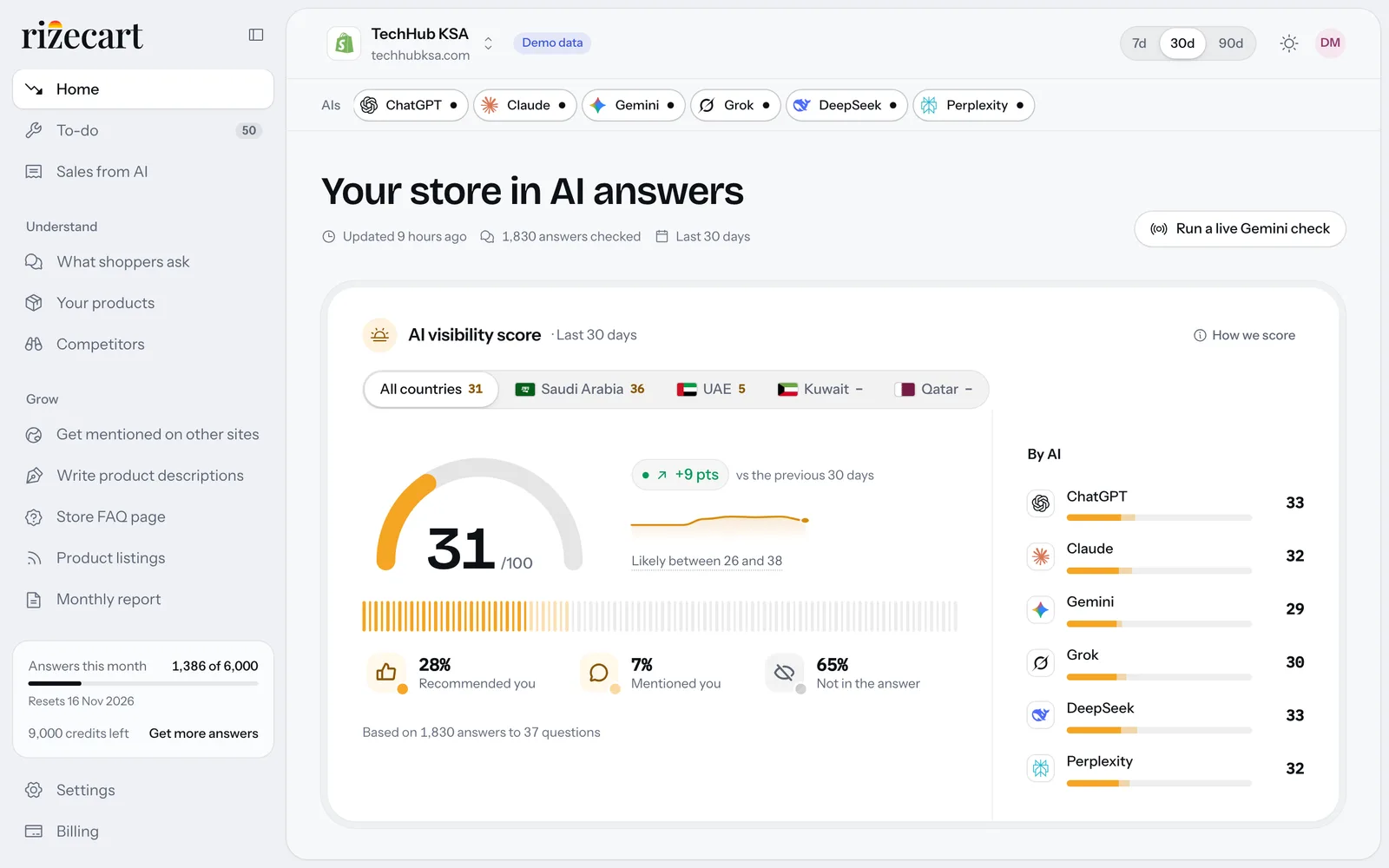
Open Home. The first card is AI visibility score, with the period beside it, like Last 30 days. It shows up once your first run has answers. The lost questions, the five key numbers and the next best fixes sit below it.
What does 0 to 100 mean?
Every question you track, asked to every AI, counts once. Each answer earns points for that question and that AI:
| What the AI did | Points | What it means |
|---|---|---|
| Recommended you | 1 | You're one of the first three stores it names. |
| Mentioned you | ½ | Your name is there, but further down. The buyer is pointed elsewhere first. |
| Not in the answer | 0 | It leaves you out, or names you only to warn buyers off. |
Your score is the points you earn out of 100. If every AI recommended you on every question, you'd score 100. If they recommended you on half and left you out on the rest, you'd score 50. A question we re-ask after a fix doesn't count twice: its answers are averaged, so it still counts once per AI.
Recommended, mentioned or not in the answer
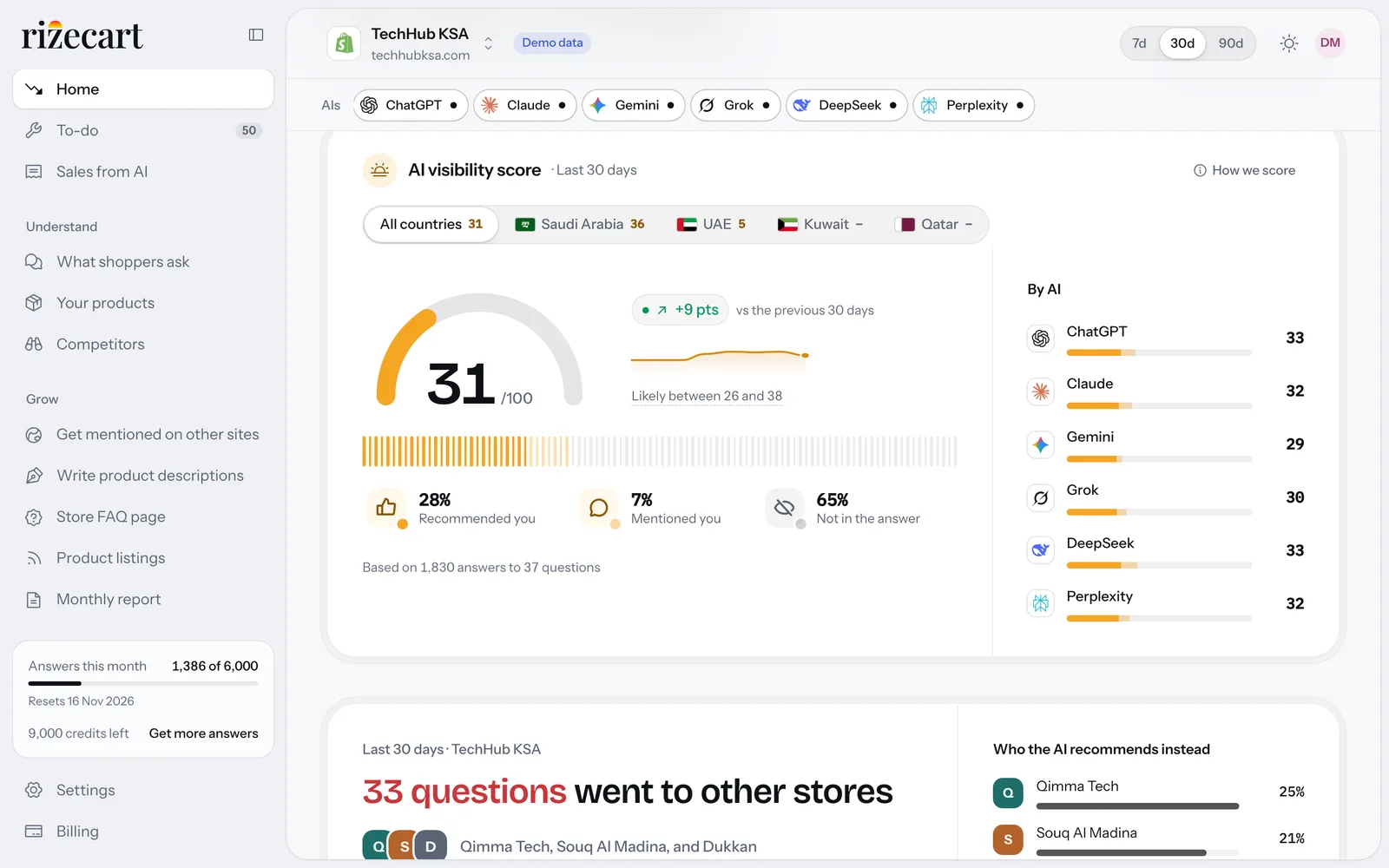
Under the number, a strip of 100 marks shows the split. Solid amber is Recommended you, light amber is Mentioned you, grey is Not in the answer. The sentence under it says the same in words: “When shoppers ask an AI your questions, you're recommended 28% of the time and mentioned 6% more. The other 66%, you're not in the answer.” Hover a label to see its definition. The last line, Based on … answers to … questions, tells you how much the number rests on.
Why the split matters: two stores can both score 40. One is recommended 40% of the time. The other is only ever mentioned, 80% of the time. The first wins buyers. The second is seen but passed over. The split tells you which one you are.
How sure is the number, and did it really move?
Read the range
Likely between 25 and 37 is the 95% range: where your true score most likely sits. AIs answer the same question differently from one day to the next, so every score is an estimate. Fewer answers, wider range. We count each question once per AI when we work out the range, so re-asking the same question many times can't make the number look more precise than it is.
Read the change
Beside the number you'll see something like +10 pts vs the previous 30 days. A filled dot and colour (green up, red down) means the change is significant: very unlikely to be chance. A hollow dot and grey text means it isn't yet. Hover it and it says “Not significant yet: it could be normal variation.” If either period has too few answers, you see No earlier answers to compare with yet.
Read the weekly line
Score, week by week is a small line with one point per week. A week without enough answers is left out, and the line appears once two weeks have a score.
Open How we score
How we score, top right of the card, opens the rules: 1 point, ½ point, 0, and the minimum below. Use it when someone on your team asks where the number comes from.
Why does it say “Not enough answers yet”?
We show a number only once there are at least 20 answers to 3 different questions. With fewer, one question would be the whole score, and a handful of answers could mislead you. Until then the card says Not enough answers yet and shows two progress bars, like “12 of 20 answers” and “2 of 3 questions”. A part you've already met shows “enough” beside it. Every run adds more answers.
The same rule applies to each country and each AI. A dash instead of a number means not enough answers there yet. It doesn't mean zero.
See the score for each country
Read the tabs
The row under the title starts with All countries, then one tab for each market your questions are about. A question's market is the city it names (a question about Dubai counts for the UAE), otherwise the country it's set to. Each tab shows its score, or a dash.
Know the order
Your own country comes first, then the other markets with the most answers. Questions about markets we don't cover sit under Other markets, always last. A new market shows up as soon as you track a question about it, before its first answers.
Pick a country
The whole card follows: the number, the split, the weekly line and By AI. The sentence names the country, like “When shoppers in Saudi Arabia ask…”. Your pick stays in the page address, so a reload or the back button keeps it.
By AI, and the filters in the top bar
By AI, on the right, is the same score for each AI in your plan (up to six: ChatGPT, Claude, Gemini, Grok, DeepSeek and Perplexity), each with a bar for its split. Hover a row to see how many answers it rests on and its likely range. A row with too few answers says Not enough answers yet or No answers yet.
The top bar steers the card too. Period (7, 30 or 90 days) sets the window, and the change compares it with the window just before. AIs narrows the score, the country tabs and the weekly line to the AIs you pick. The ones you hide stay in By AI, faded, with the note Hidden by your AI filter.
The score in the monthly report
In Monthly report, pick the Month and open the printable report with Open in English or Open in Arabic. It has a table, AI visibility score by country: each country's score, how often the store was recommended and how often it was mentioned, and the number of answers, with All countries first when there's more than one. A country with too few answers says Not enough answers yet instead of a number. The table covers every AI you track for that month.
What do you do with the score?
- Find the weak country: the tab with the lowest score, or a dash where you expected sales.
- Pick that country, then find the weakest AI in By AI.
- Read the split. Mostly light amber: the AI knows you but names three stores first. Mostly grey: it leaves you out.
- Scroll down Home to the lost questions. Use AIs in the top bar to show only that AI, and read why you were skipped.
- Go to To-do and apply the fixes that win back the most questions. Then give it a few runs and judge the change only when its dot is filled.
Next: Read your Home screen and pick your first fix. Before you apply anything, see how you stay in control in Approve fixes, auto-apply safe ones, undo any change. For why an AI picks another store, read Why ChatGPT recommends your competitor.
Before you move on
- You can say what the score counts: 1 point when recommended, ½ when mentioned, 0 when left out.
- You know your likely range and whether the last change is significant.
- You checked the score for each country your questions are about.
- You found the country and the AI where your score is lowest.