By the end of this lesson
You can pick your first questions, add your own in a shopper's words, and pause the ones that no longer matter.
An AI doesn't rank stores in a list. It answers a question. “Best oud” and “Best oud under $150 delivered to Doha in 2 days” get different stores, because the details decide who can be trusted with the order. Rizecart asks the questions you track to every AI in your plan that you've turned on, and records which stores each one named. Track vague questions and you measure the wrong thing.
What makes a good question?
- It's written the way a shopper types it. Real wording beats keywords.
- It carries the details buyers add: the city, a budget, a delivery deadline, an occasion.
- It's in your buyers' language. Arabic and English questions are tracked separately, so add both if you sell in both.
- You can win it. You sell the product, at that price, and you deliver to that city.
| Too vague | Worth tracking |
|---|---|
| oud | Best oud under $150 delivered to Doha in 2 days |
| gift set | Perfume gift set for Eid delivered to Dubai by Thursday |
| perfume, asked in Arabic | The same Doha question, asked in Arabic: track it in both languages |
Pick your first questions during setup
Read the suggested list
On Pick your first questions, Rizecart lists real questions picked from your products, with the details buyers add. Each one has a short line under it saying why it matters.
Tick the ones that fit your store
The first five are ticked for you. Untick anything you don't sell or don't deliver, and tick any others that fit.
Start tracking
Choose Track 5 questions (the number follows your picks). If you'd rather choose later, choose Skip for now.
Let the AIs answer
You'll see We're asking the AIs now. Results arrive in a few minutes. Choose See my results to open your results.
How do I add a question of my own?
Open the form
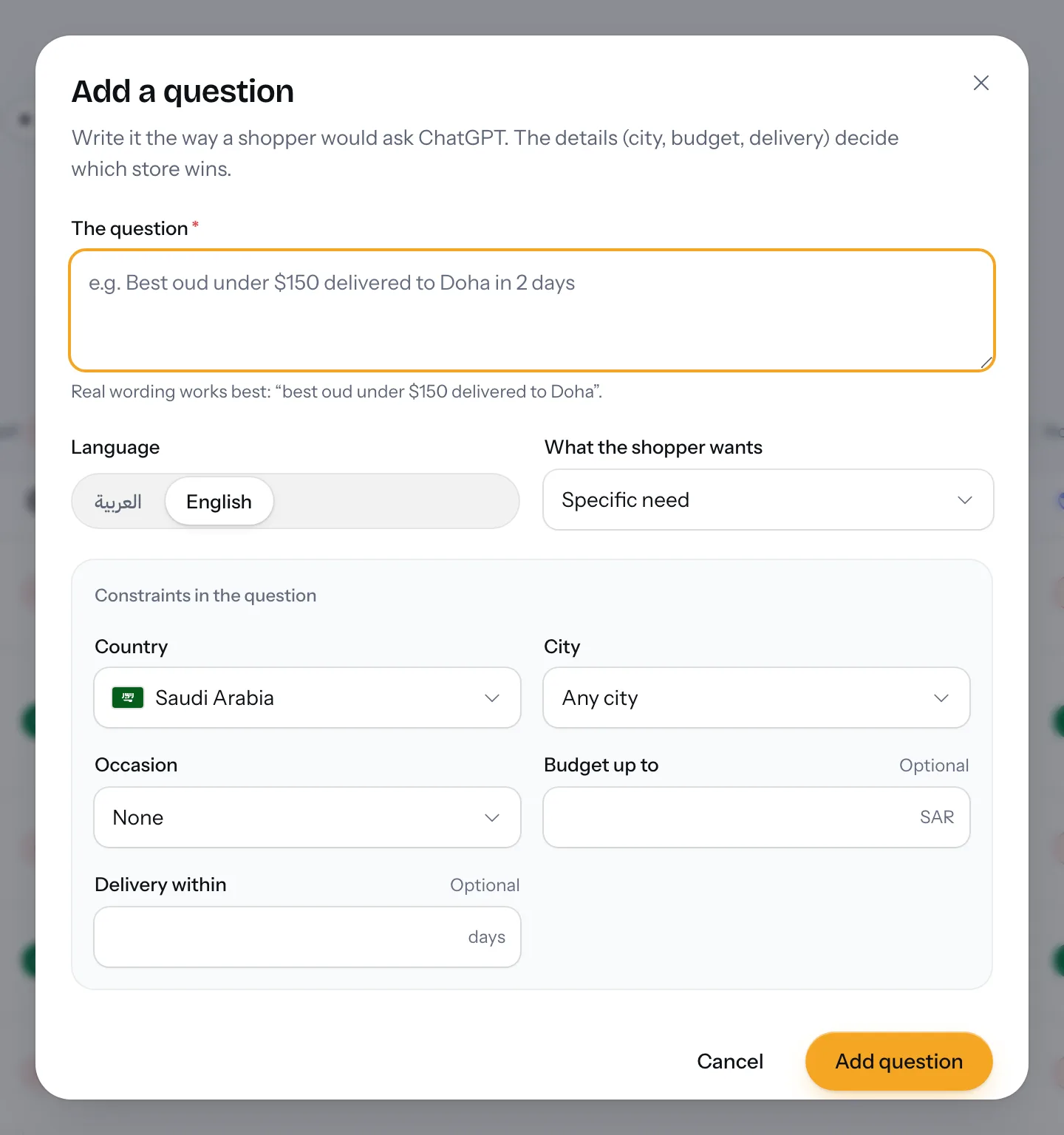
Open What shoppers ask in the sidebar and choose Add a question.
Write the question
In The question, type it the way a shopper would ask ChatGPT. The app's own hint: real wording works best.
Set the language and the goal
Pick Language (Arabic or English). Under What the shopper wants, choose Looking for the best, Specific need, Comparing, Looking for a store, Nearby or Gift.
Add the constraints
Under Constraints in the question, pick the Country (your store's own, unless you change it), then the City, Occasion, Budget up to and Delivery within (days). Budget and delivery are optional. The budget uses the currency shown next to the field.
Save it
Choose Add question. You'll see “Question added. We'll ask every AI in the next run.”
Use the suggestions
Under your questions, Questions buyers ask that you don't track lists more questions picked from your products, cities and the season. Choose Track it on any that fit. It's the fastest way to fill your plan with questions worth asking.
Pause what no longer matters
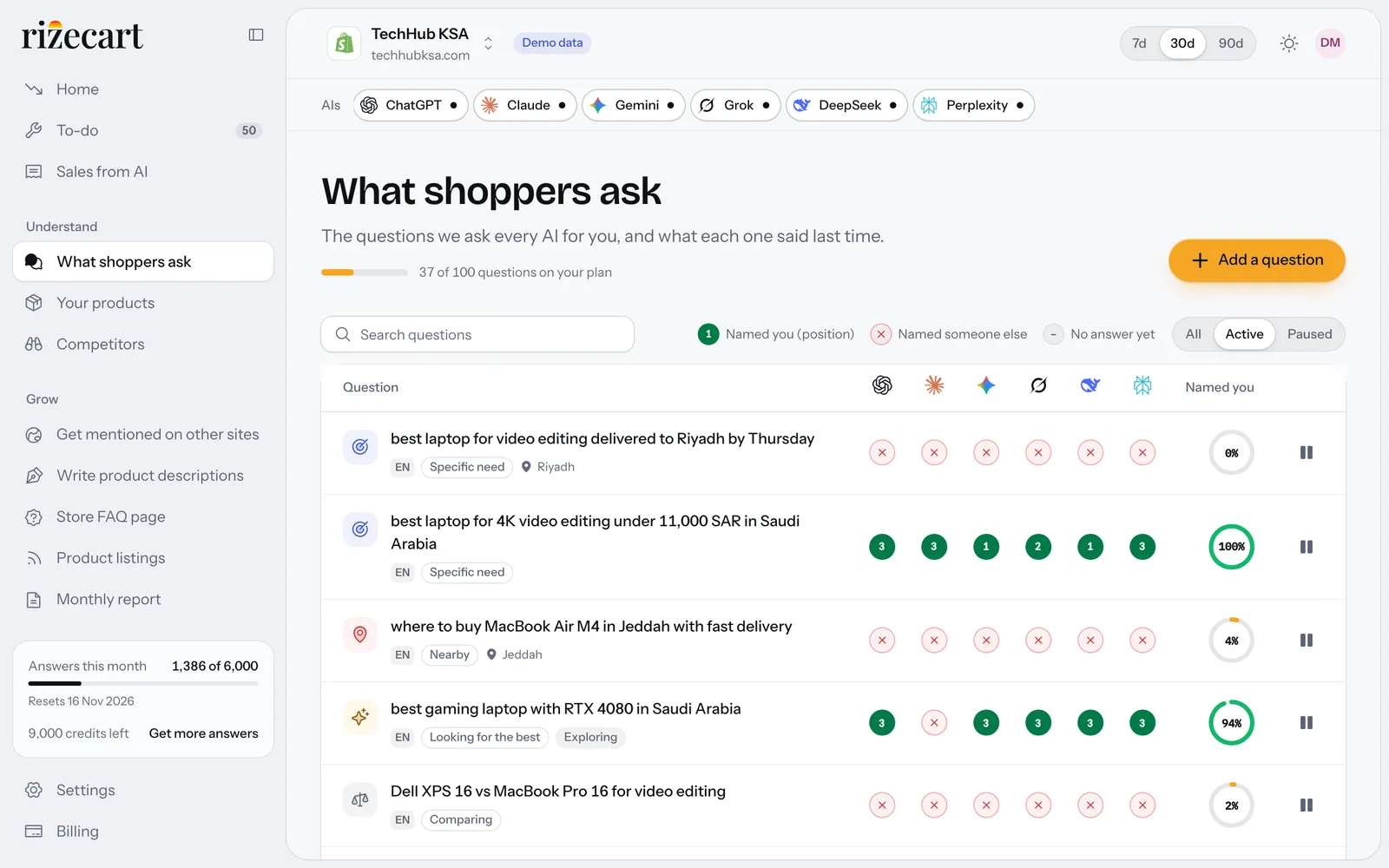
The What shoppers ask table shows every question and, under Named you, a dot for each AI: named you (with your position), named someone else, or no answer yet. Use Search questions and the Status filter (All, Active, Paused) to find one. When a product sells out for the season or you stop delivering somewhere, use Pause this question. We stop asking it, and paused questions don't count toward your plan.
The header shows how many questions your plan tracks, for example “20 of 25 questions on your plan”. Each plan has its own limit: see pricing.
Next: Read your AI visibility score, then Read your Home screen. To see why the details decide the winner, read Why ChatGPT recommends your competitor.
Before you move on
- You track at least five questions written the way your buyers ask.
- Your questions carry real details: city, budget, delivery time or occasion.
- You track Arabic and English questions if you sell in both languages.
- You know how to pause a question you can't win.