By the end of this lesson
You can open Sales from AI, read its numbers, check them against the order list, and spot when AI shoppers land on the wrong page.
Home shows the questions. Sales from AI shows the money. When your fixes start to work, the orders should appear here, each one with the signal that proved it came from an AI. Read this page the same way every week and you'll know whether the AI channel is growing, and by how much.
Read Sales from AI in six steps
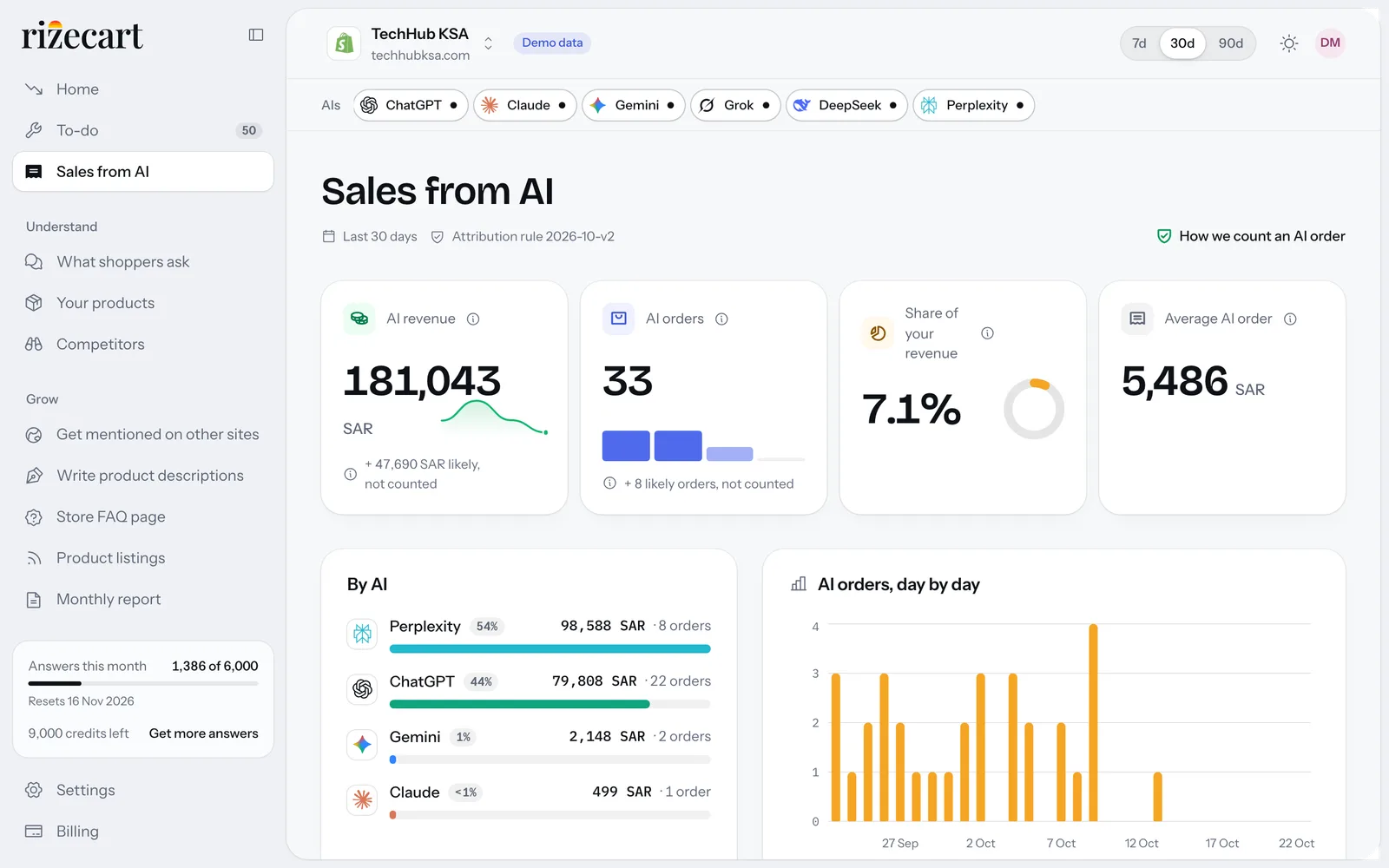
Open Sales from AI and set the period
Open Sales from AI in the sidebar and pick a Period in the top bar: 7, 30 or 90 days. The header repeats the period and shows Attribution rule with its version.
Read the numbers at the top
AI revenue, AI orders, Share of your revenue and Average AI order sit at the top. Once Rizecart has visit data, a fifth card, AI visitors convert, joins them. The table below explains each one.
See which AI sent them
By AI shows confirmed revenue from each assistant, with its order count.
Look at the days
AI orders, day by day charts confirmed orders. Hover a day to see its revenue.
Check where shoppers land
Where AI shoppers land shows the share of AI shoppers who arrived on your homepage instead of the product the AI recommended.
Spot-check the orders
Scroll to Orders from AI. Each row shows the order number and date, Came from, Signal · landing page, the products and the Total. Pick two or three and make sure their signals make sense to you.
What do the numbers mean?
| Number | What it means | The line under it |
|---|---|---|
| AI revenue | Revenue from confirmed AI orders only. | “+ … likely, not counted”: revenue from likely orders, kept out of the total. |
| AI orders | Confirmed orders: the visit came from an AI site, carried an AI utm_source, or your platform tagged the channel as AI. | “+ 2 likely orders, not counted”, for example. |
| Share of your revenue | Confirmed AI revenue as a share of all your store's revenue in the period. | Nothing: a ring shows the same share. |
| Average AI order | Confirmed AI revenue divided by confirmed AI orders. | Nothing. |
| AI visitors convert | How much better AI visitors convert than everyone else. | “vs other visitors”. The card appears only once Rizecart has visit data for your store. |
Why does the landing page matter?
A shopper who clicks through from an AI has usually decided already. If they land on your homepage, they have to search for the product again, and some won't. The panel's advice is to send them straight to the product: keep your product links in the feeds the AIs read. Check your product listings opens Product listings, where each feed carries every product's own link.
A five-minute weekly routine
- Open Sales from AI on the same day each week, with the same period, so you compare like with like.
- Write down confirmed AI orders and AI revenue. Keep likely orders in a separate column.
- Open To-do and choose Approved by you (or Auto-applied). Next to each fix you'll see the change in mentions since it went live, and whether it's significant or not significant yet.
- Check Where AI shoppers land. If the homepage share is high, fix your product listings before anything else.
- Note the rule version from the header. If it changes, mention it when you compare weeks.
Next: Share results with your team. To set up tracking beyond Rizecart, read How to track orders from ChatGPT.
Before you move on
- You can find confirmed AI orders and AI revenue for the last 30 days.
- You know the likely numbers are shown but never added.
- You checked the signal on at least two orders.
- You know your homepage landing share and what to do if it's high.