By the end of this lesson
You can give the right people access to Rizecart, send the weekly report in the right language, and send each client a report of their own store, without exposing your other clients.
Results only count when the people who act on them see them: whoever edits the product pages, runs shipping, or signs off the budget. You don't need to build a slide deck. Invite them, and they see the same screens you do.
Which role should each person get?
| Role | What they can do | Good for |
|---|---|---|
| Owner | Controls billing, the team and everything else. | The business owner |
| Admin | Manages stores, settings, fixes and the team, but not billing. | Your store manager |
| Member | Applies fixes and writes content. | Whoever edits your product pages |
| Viewer | Sees the stores you give them and changes nothing. | A partner, manager or client who wants the numbers |
Invite someone
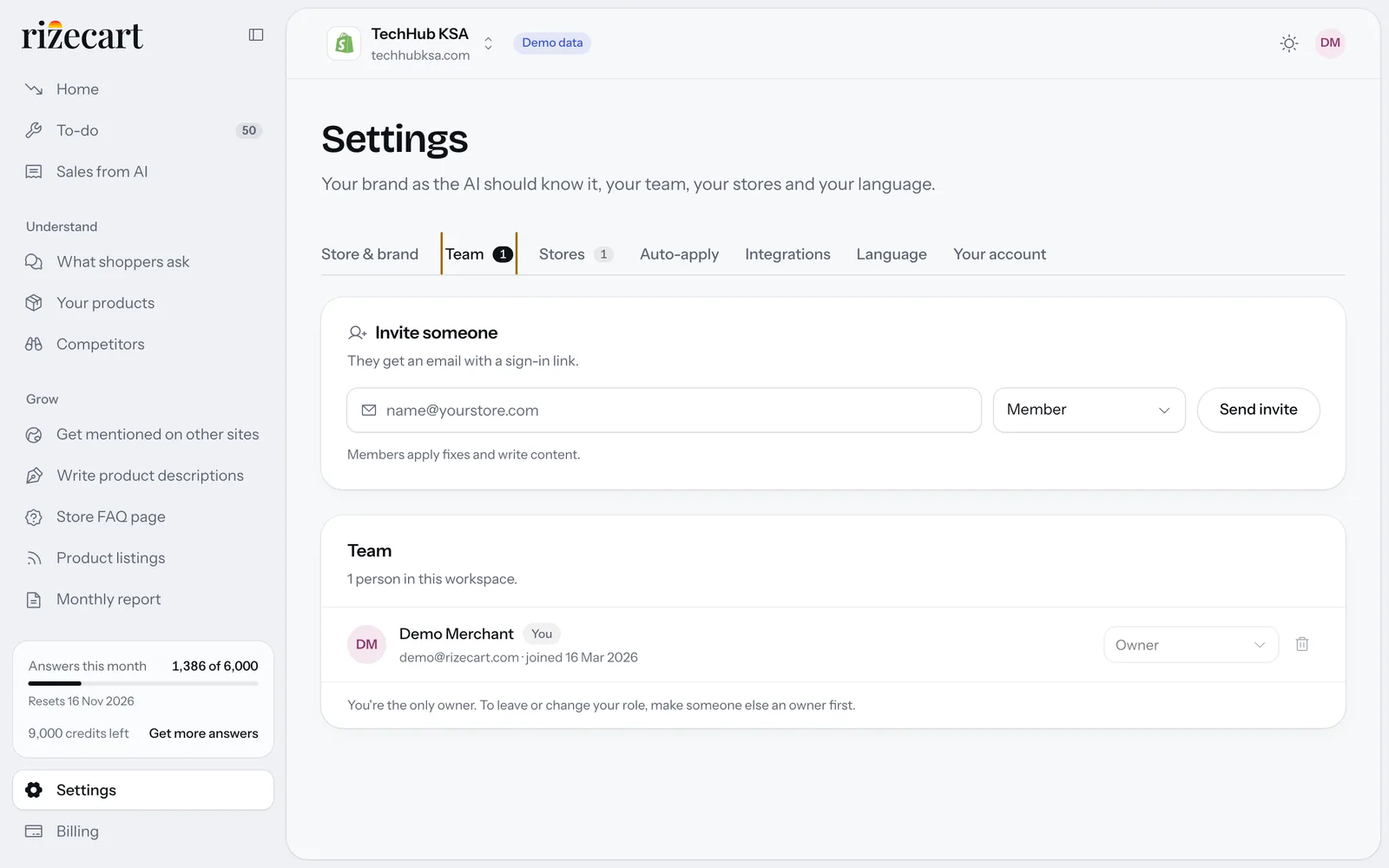
Open the Team tab
Open Settings and choose Team. Only owners and admins can invite people.
Send the invite
Under Invite someone, type their email, pick a Role, and choose Send invite. A line under the form explains what that role can do.
Let them join
They get an email with a link to join and show as Invited until they accept. They sign in with Google, Apple, or their email and a password.
Adjust later
Change anyone's role from the team list, or use Remove from workspace. Every workspace keeps at least one owner.
How do I turn on the weekly report?
Switch it on
Open Settings, Store & brand. In the Email panel, switch on Weekly report: “Every Sunday: questions you won, questions you lost, and the fixes that matter.” Then choose Save changes.
Pick its language
Open the Language tab. Under Report and email language, pick Arabic or English. It's used for the weekly report and for emails to the whole team. The app's own language is separate: each person picks their own.
What to show, and how to say it
- The loss: the verdict on Home, in one sentence: how many questions, which stores won them, and the main reason.
- The work: the fixes marked Approved by you or Auto-applied in To-do, with the effect we measured on each. Applied changes lists exactly what changed on the store.
- The money: confirmed AI orders and AI revenue from Sales from AI. Say plainly that likely orders aren't counted.
- The rule: for anyone who asks how an order was counted, link the public attribution rule and give the version shown on Sales from AI.
For agencies: sharing with clients
In an agency workspace, the store switcher lists every client under Client stores. Owners and admins always see every store. Members and viewers see every store too, unless you limit them to some.
Invite the client as a viewer of their store
In Settings, Team, type their email and pick Viewer. Under Store access, choose Selected stores and tick their store, then Send invite.
Check who sees what
Each person in the team list shows All stores or how many stores they can see. Use the store button beside their role to change it. They only see their stores, everywhere in Rizecart.
Send each client a monthly report
Open Monthly report
Choose Monthly report in the sidebar, switch to the client's store, and pick the Month. You see that month's lost questions, fixes applied and orders from AI, with a short summary at the top.
Print it or save a PDF
Choose Open in Arabic or Open in English, then Print or save as PDF. The printable report also shows the store's AI visibility score for each country its buyers ask from.
Or share a read-only link
Choose Share a link, pick the month, the language and how long it works (7, 30 or 90 days). Your client opens it without signing in and sees that store only. Turn a link off any time from Read-only links.
Or email it every month
Under Monthly email to your client, add their emails, pick the language and switch it on. On the 1st of each month at 6am Riyadh time, they get last month's report with a link that works for 90 days. Owners and admins set this up.
To show a prospect what's at stake, run the free store check on their store. See what the Agency plan includes on For agencies and pricing.
Before you move on
- Everyone who acts on the results has the right role.
- The weekly report is on, in the language your team reads.
- You know how to share a view with a teammate by link.
- If you're an agency, every client you invited sees only their own store, and gets their monthly report.