By the end of this lesson
You can approve the fixes for each collection page, publish a store FAQ page you've checked line by line, and copy the same answers into Shopify's Knowledge Base.
A buyer asks ChatGPT: “Best oud perfume under $150, delivered to Riyadh.” The answer can come from a product page, but also from the page that lists all your oud perfumes, and from a page that answers delivery and returns. If those pages say almost nothing, the AI quotes a store whose pages say more. This lesson fixes both, step by step.
Why do collection pages matter?
A collection page (a category on Salla and Zid) lists everything you sell of one kind. When a buyer asks for “the best” of something, it's a natural answer: one link, many options. But most collection pages carry a title, a grid of products and nothing else. From that, an AI can't tell what you sell, what it costs or how fast it arrives.
Read the Collections tab
Open Your products and switch to the Collections tab. Rizecart reads your collections on every sync and checks each page for the facts an AI looks for.
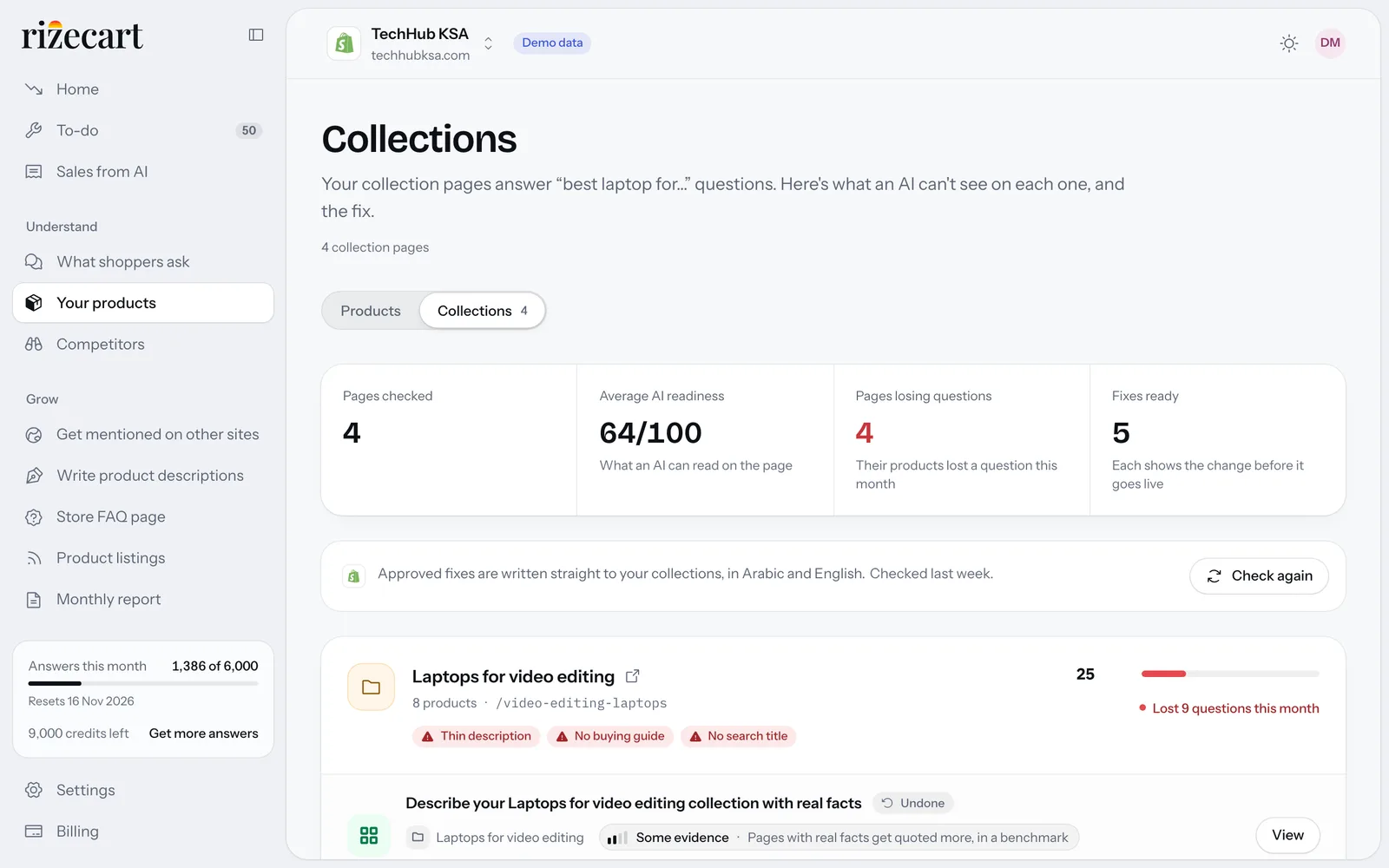
| Number | What it tells you |
|---|---|
| Pages checked | How many collection pages Rizecart read from your store. |
| Average AI readiness | Out of 100: how much of what an AI looks for your pages carry, on average. |
| Pages losing questions | Pages whose products lost a question to another store this month. |
| Fixes ready | Fixes waiting for you. Each one shows the change before it goes live. |
Below the numbers, one line says what your platform lets Rizecart change and when the pages were last checked. Then comes one card per page: its name (the arrow opens it on your store), how many products it holds, its AI readiness out of 100 and how many questions it lost this month. Red chips name what's missing. A complete page says Nothing missing.
| Chip | What it means |
|---|---|
| Thin description | Fewer than 30 words of text, in every language. |
| No buying guide | The text doesn't tell a buyer at least two of three things: what to compare, what things cost, how fast you deliver. |
| No search title | No search listing: the title and description that search results and AI previews show first. |
| No Arabic / No English | One language has a real description, the other has almost none. |
How do you approve a collection fix?
Under each card sit the fixes for that page, with what each one wins back and what it costs. Every fix is written from your own products: how many you carry and from which brands, a few of your most-reviewed products in stock, the specs they have in common, the price range, the delivery time to your main city, the return window and how many are in stock now.
Open the fix
Click Fix it. The fix is marked Waiting for you: nothing has changed on your store yet.
Read the before and after
You see each field as it is now and as it will be, in Arabic and English. A fact your products don't state, like a delivery time, is left out, and the fix tells you. Add it in your shipping settings and the next check adds it to the page.
Apply or dismiss
Apply fix writes the change to your store. Dismiss removes it, and that fix isn't suggested again for the page.
Let Rizecart check the result
Rizecart re-checks the page right away and re-asks the questions linked to its products about 3 days later, once the AIs have re-read the page.
What can Rizecart write on your platform?
| Platform | Written for you once you approve | By hand |
|---|---|---|
| Shopify | The description and the search listing (search title and description), in Arabic and English | Nothing |
| Zid | The description and the search title and description, in Arabic and English. The category name stays as it is. | Nothing |
| Salla | Only the search title and description | The page text: description, buying guide or a missing language |
| WooCommerce | The category description | The search title and description |
A by-hand fix shows How to do it instead of Fix it, with the exact text to paste and where. On Salla: “Salla → Products → Categories → open the category.” Salla gives apps no box for category text, so paste it where your theme shows category text, or put the same facts on your store FAQ page (next section). On any other platform, open the collection in your store admin and paste the text. By-hand fixes are free.
One Shopify limit: Shopify doesn't let apps edit collections on its Starter plan. If a fix can't be written, it shows Failed and nothing changes on your store. Changed a page yourself? Click Check again: Rizecart re-checks every page now and reads your latest collections in the next sync.
Publish a store FAQ page
Shoppers also ask the AI what a product page rarely answers: “Do they deliver to Dammam, and how fast?”, “Can I return it?”, “Which gift sets are under $100?” If no page on your store answers these in one place, the AI quotes a store whose pages do.
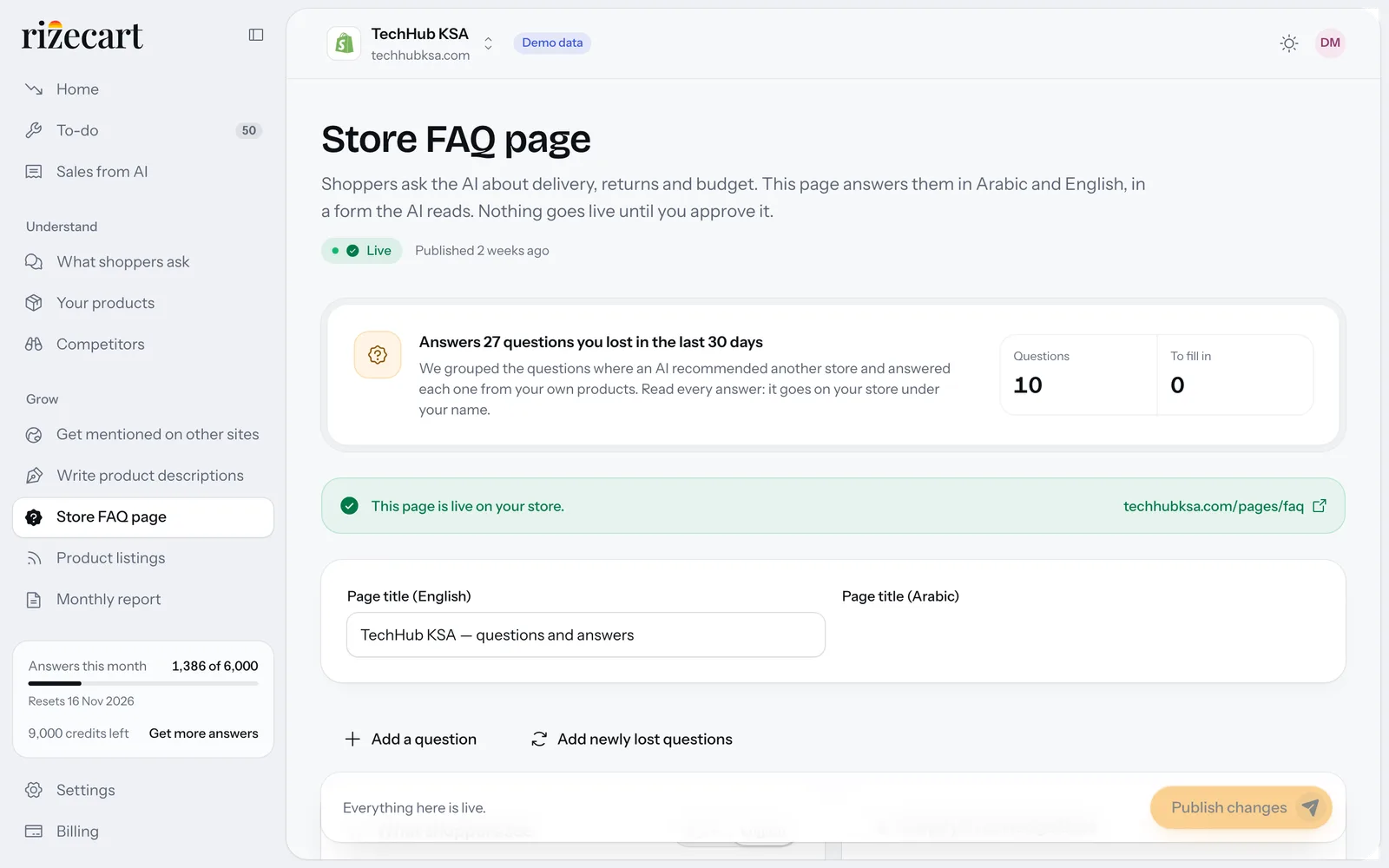
Open FAQ page in the sidebar. The first time, Rizecart drafts the page from the questions you lost in the last 30 days. It groups them by what the buyer needed (delivery to a city, returns, a budget, a use case, an occasion), puts the most-lost first, and answers each in Arabic and English from your own data: your delivery times and shipping prices, your return rules, your in-stock products and their prices.
Read every answer
The card at the top says how many of your lost questions the page answers. Each question has a red badge with the lost questions behind it; hover over it to see them. Read every answer: it goes on your store under your name.
Fill the highlighted gaps
When Rizecart doesn't know a fact, it never guesses. It writes a placeholder in angle brackets, like
<number of days>or<shipping price>, and marks the question Fill this in. To fill in counts them. Replace each one with your real answer: you can't publish while one is left.Edit, add and remove
Change any question, answer or page title, in either language. Add a question adds one of your own; the bin icon (Remove this question) deletes one. Save draft keeps your work without publishing it.
Add newly lost questions
Lost more questions since the draft? Add newly lost questions adds them, keeps your edits and never brings back a question you removed.
Check what shoppers see
What shoppers see previews the page in Arabic or English at your store's
/pages/faqaddress. Open Structured data (FAQPage) to see the hidden data the page carries, so AI crawlers and search engines can read each question and answer. Copy code gives you the same as JSON-LD if you need it elsewhere.Approve and publish
On Shopify and WooCommerce, click Approve and publish. The page goes live on your store in a few seconds. On Salla and Zid, follow the steps on the page (below).
Where does the page go live?
| Platform | How it goes live |
|---|---|
| Shopify | Approve and publish creates the page at /pages/faq in your store's main language, with the other language added as a Shopify translation when your store has it turned on. If you already have a page at /pages/faq, Rizecart never overwrites it: the new page goes to /pages/faq-answers. Credits are charged once, on the first publish. Later edits go live with Publish changes. |
| WooCommerce | Approve and publish creates the page on your WordPress site through the Rizecart plugin for WooCommerce, so keep the plugin installed and active. Later edits go live with Publish changes. |
| Salla and Zid | By hand, in about five minutes: Settings → Store pages → add a new page. Give it the title shown, then use Copy the Arabic page and Copy the English page and paste. Only answers with no gaps left are copied. A page you add by hand costs no credits. |
Once the page is live, its status says Live, with its address. Rizecart re-asks the questions it answers about 3 days later, so you see whether the AI starts naming you. Until it's live, the page also waits on your To-do list as “Publish a store FAQ page that answers what buyers ask”, and Review the page brings you back here.
Copy your answers into Shopify's Knowledge Base
Shopify's Knowledge Base app is where AI shopping agents read your store's answers. Shopify documents no API and no import for it, so Rizecart never writes to it. Instead, it hands you the same answers, ready to copy: the Shopify Knowledge Base card on the FAQ page (Shopify stores only), also linked from Settings › Integrations.
Download the list
Click Arabic list (CSV) or English list (CSV). It holds your saved answers that have no gaps left.
Open the app in Shopify
In Shopify admin, open Apps → Knowledge Base → Add FAQ. Install Shopify's Knowledge Base app first if you don't have it.
Add one FAQ at a time
Paste one question and its answer, save, then the next. The app keeps one language per FAQ, so use your store's main language.
Next: Add llms.txt and agents.md to your store. Placeholders for delivery or returns in your draft? Fix them at the source with Delivery times by city and Shipping and returns policies an AI can read. To see how one missing fact sends a buyer elsewhere, read Why ChatGPT recommends your competitor.
Before you move on
- You opened Products › Collections and know which chips your pages show.
- You approved or dismissed every collection fix, and did the by-hand ones.
- Every answer on your FAQ page is read, with no placeholder left.
- Your FAQ page is live on your store, published by Rizecart or by hand.
- On Shopify, your answers are in the Knowledge Base app.