By the end of this lesson
You know what the two files can and can't do, and every file your platform can host is on your store with the status Live and up to date (on Shopify, agents.md stays Managed by Shopify).
Someone may have told you your store needs an llms.txt file to show up in ChatGPT. Here's the honest version: what the two files are, what they can't do, and how to add the ones Rizecart writes for you in a few minutes.
What are llms.txt and agents.md?
Both are plain-text files at your store's address, like yourstore.com/llms.txt. They're written in Markdown, the simple format that uses # for headings and - for lists.
- llms.txt is a short summary of your store for AI tools, in the llmstxt.org format: your name, a one-line summary, the key details (what you sell, prices, delivery, returns, languages), then lists of links to your products and policies.
- agents.md is a guide for AI shopping agents: what you sell, best sellers with links, delivery times, returns, how to buy, and rules such as “use the price shown on the product page” and “don't promise discounts the store doesn't show”. Shopify already serves one on every store.
If your store sells in Arabic, both files give the same facts in English, then in Arabic.
What can these files do, and what can't they?
No AI company has promised to use either file, and they won't lift your rankings on their own. The best data so far says AI bots rarely read llms.txt. In a 12-week test on 83 sites, EZY Research counted 7 fetches of llms.txt by OpenAI's bots, against 3,990 fetches of robots.txt. And Google says you don't need special AI files to appear in its AI features.
97%
So why add them? Because they cost you almost nothing. Rizecart writes both from your store's own data, rewrites them when that data changes, and tells you when the copy on your store falls behind. If an AI tool or a shopping agent does open them, it finds your real delivery times and return rules, not a guess. Your real effort still belongs on your product pages: the facts in Fix what the AI can't see matter far more.
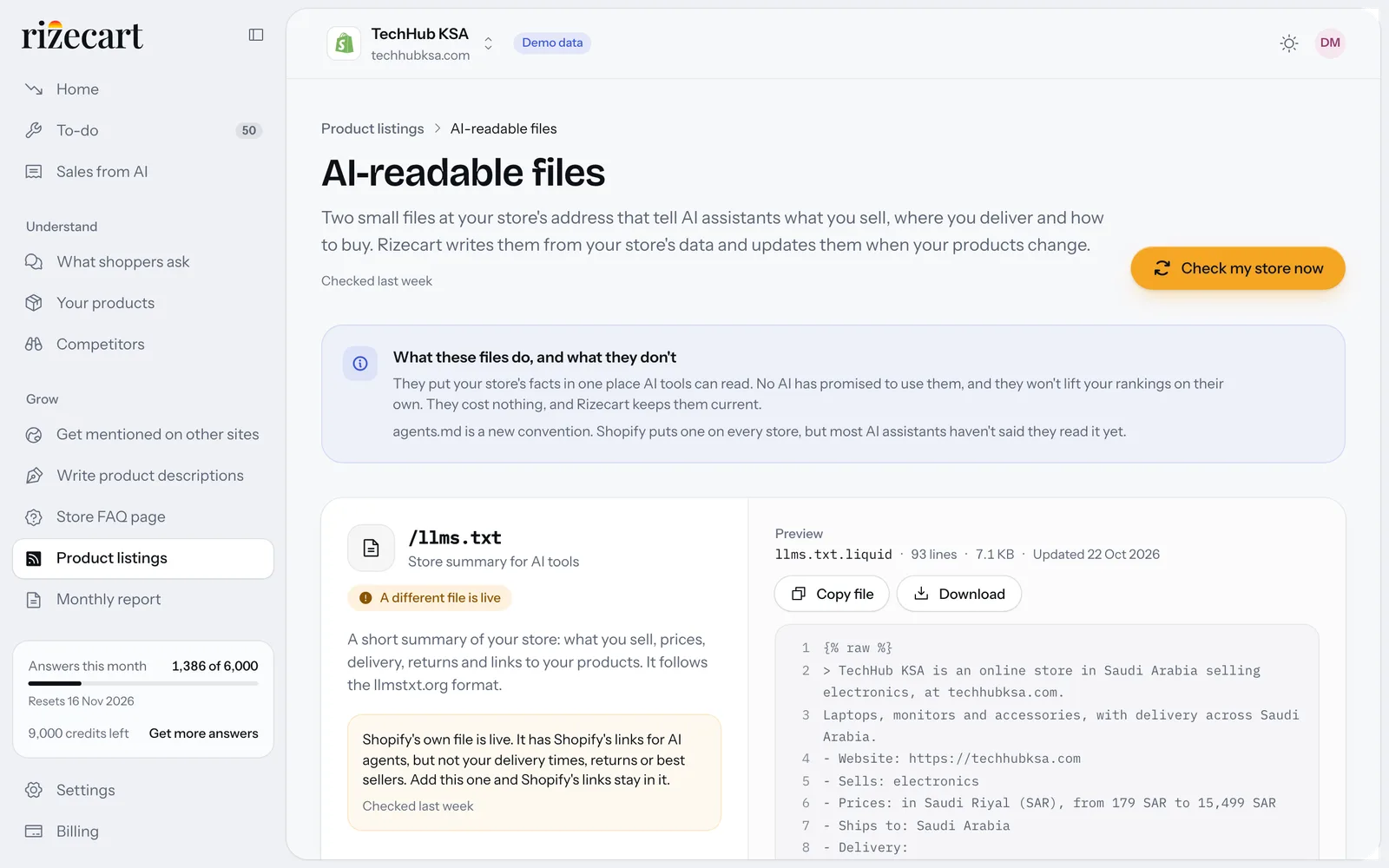
Open Product listings › AI-readable files
Open Product listings and click the AI-readable files card. At the top, What these files do, and what they don't says the same as above. Check my store now opens both addresses on your live store and records what it finds. Rizecart also checks after every sync.
What does each status mean?
| Status | What it means | What to do |
|---|---|---|
| Live and up to date | Your store serves this exact version. | Nothing. |
| Live, but out of date | Your store has an older version. Your products or policies changed since. | Paste the new file over the old one. |
| A different file is live | Another file sits at that address, without your delivery times, returns or best sellers. On Shopify's /llms.txt, it's Shopify's own file. | Replace it with this one. |
| Not on your store yet | Nothing at that address yet. | Add it with the steps below. |
| Your platform can't host it | Your platform has no way to put a file at that address. | See your platform below. |
| Not checked yet | Rizecart hasn't looked yet. | Click Check my store now. |
What's in it, and the preview
What's in it lists the facts a file can carry, from About your store and Products with links to Delivery times, Returns and Arabic. Best sellers come from your own orders over the last 90 days. Faded items aren't published on your store yet, so they're left out, never guessed. Publish the missing fact on your store, and the file picks it up after the next sync.
Next to it is the file itself, line by line, with its name (on Shopify, the theme template to create), its size and the date it last changed. Copy file copies it. Download saves it.
Which file can your platform host?
| Platform | /llms.txt | /agents.md |
|---|---|---|
| Shopify | Yes: a theme template, llms.txt.liquid | Managed by Shopify: keep it |
| Salla | Yes: Marketing → SEO → General settings → LLMs.txt file | Not today: no file and no setting |
| Zid | Not today: ask Zid support | Not today: ask Zid support |
| WooCommerce | Yes: upload the file to your site's main folder | Yes: upload the file to your site's main folder |
Add llms.txt on Shopify
Shopify already serves its own /agents.md on every store, with the links AI agents use to search your catalogue and check out. In Rizecart its card says Managed by Shopify: keep it, and don't add an agents.md.liquid template, which would replace Shopify's file and drop those links. Shopify also shows that file at /llms.txt until your theme has an llms.txt.liquid template, so the llms.txt card first says A different file is live. Shopify's file has no delivery times, returns or best sellers, so add Rizecart's llms.txt, which carries them.
Open your theme code
In Shopify admin, open Online Store → Themes. Next to your live theme, click … then Edit code.
Create the template
In the templates folder, create a new file named
llms.txt.liquid. Don't createagents.md.liquid: Shopify's own agents.md stays.Paste and save
Click Copy file in Rizecart, paste it into the new file, then click Save.
Check it
Come back and click Check my store now. The status should read Live and up to date.
Add llms.txt on Salla
Open the SEO settings
In your Salla dashboard, open Marketing → SEO.
Open the llms.txt setting
Under General settings, open LLMs.txt file.
Paste and update
Click Copy file in Rizecart, paste it, then click Update.
Check it
Come back and click Check my store now.
Salla may add a few lines of its own at the end, such as a link for AI checkout. That's fine. Salla serves no agents.md and has no setting for one, so that card says Your platform can't host it. Your llms.txt carries the same facts. Salla's own guide: LLMs.txt file.
And on WooCommerce?
WooCommerce runs on your own WordPress site, so both files can live at its address. Download each file and upload it to your website's main folder, so it opens at yourstore.com/llms.txt and yourstore.com/agents.md. Your host's file manager or your web developer can do this. Then come back and click Check my store now.
And on Zid?
Zid doesn't serve either file today and has no setting for them, so both cards say Your platform can't host it. Rizecart still writes and updates both. Download the file and ask Zid support to publish it at your store's address. Rizecart checks again on every sync, so the status changes by itself the day the file is live.
How do the files stay current?
Rizecart rebuilds both files from your store's data. A file gets a new version only when a fact in it changes: a new best seller, a new price range, a new delivery time. When the copy on your store is older, its status turns Live, but out of date. Copy the new file, paste it over the old one and click Check my store now.
Check any store for free
Not connected yet? The free store check now reports whether a store serves /llms.txt and /agents.md. It's reported, not scored. For the full evidence, read llms.txt for online stores: what it does and doesn't do.
Next: Act faster with Shopify Flow. Haven't fixed the pages buyers see yet? Start with Fix your collection pages and publish a store FAQ.
Before you move on
- You can say in one sentence what llms.txt and agents.md can and can't do.
- You opened Product listings › AI-readable files and clicked Check my store now.
- Every file your platform can host reads Live and up to date, and on Shopify, agents.md reads Managed by Shopify.
- You know to paste the new version when a status says Live, but out of date.