By the end of this lesson
You can connect a Rizecart trigger to a Shopify Flow workflow, read its status in Settings, and recheck a product in AI answers after you change it.
Rizecart asks the AIs your questions on every run. When ChatGPT names a rival for one of them, you shouldn't find out a week later because nobody opened the app. If your store is on Shopify, Shopify Flow can tell your team the moment it happens. Flow is Shopify's own automation app: a workflow starts from a trigger and then does something, like sending an email.
Where do you find it?
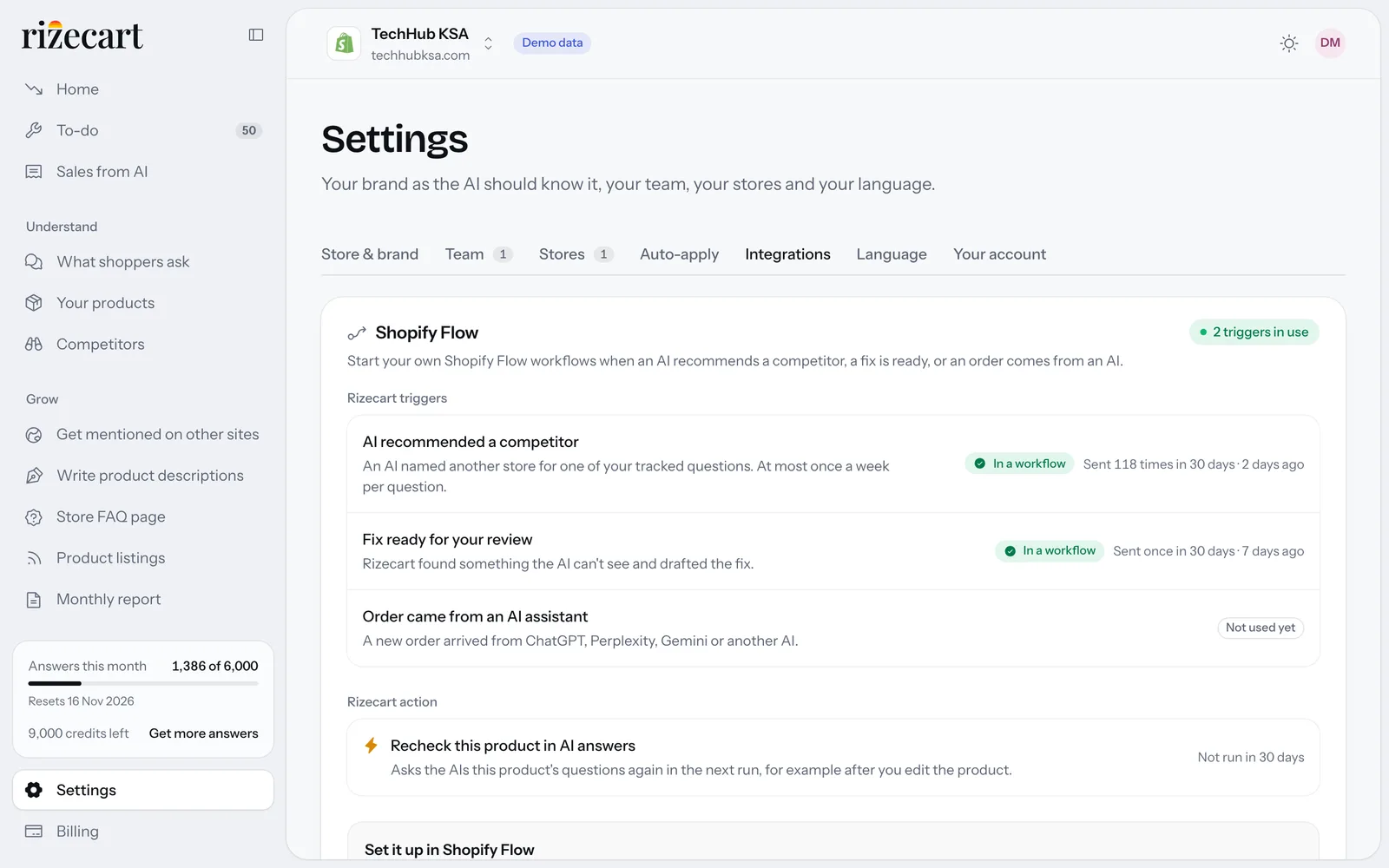
Open Settings and choose the Integrations tab. The Shopify Flow card shows how many triggers you use (“2 triggers in use”, or Not set up yet), then Rizecart triggers, Rizecart action and Set it up in Shopify Flow. Under it sits the Shopify Knowledge Base card, covered at the end of this lesson.
The three triggers
A trigger is the event that starts your workflow. Rizecart offers three. Each one carries details your workflow can use, like the question or the AI.
| Trigger | When Rizecart sends it | What it carries |
|---|---|---|
| AI recommended a competitor | An AI named another store, not you, for one of your tracked questions. At most once a week per question, whichever AI it was. | The question and its language, the AI, the store it recommended, the main reason you were skipped, and a link to Rizecart. |
| Fix ready for your review | Rizecart found something the AI can't see and drafted a new fix, from an AI answer or from the check of your collection pages. Once per fix. | The fix title and type, how many questions it affects, the page it's for, and a link to Rizecart. |
| Order came from an AI assistant | A new order arrives that Rizecart counts as coming from an AI, Confirmed or Likely. Once per order, and only for orders placed in the last 48 hours. | The order, the AI, the attribution level, the order total and the currency. |
The 48-hour rule means the order trigger fires only for new orders as they come in. The order history Rizecart reads when you connect your store never sends it, so your team won't get a flood of old orders. How an order counts as Confirmed or Likely is explained in How Rizecart counts an order as coming from AI.
The action: Recheck this product in AI answers
An action is something a workflow does. Rizecart adds one: Recheck this product in AI answers. It asks the AIs the product's tracked questions again in the next run. Use it after you edit a product, so you see sooner whether the change helped. If no tracked question is linked to that product, there's nothing to re-ask and nothing happens.
How do you set it up?
Open Flow
In Shopify admin, open the Flow app. Install Shopify Flow from the App Store if you don't have it.
Find Rizecart
Create a workflow, choose Select a trigger and search for Rizecart.
Pick a trigger and what happens
Pick a Rizecart trigger, then add what should happen: an email to your team, a product tag, a message.
Turn it on
Turn the workflow on. Back in Rizecart, the trigger shows In a workflow once it's on.
How do you read the status?
- In a workflow: you have a workflow turned on that uses this trigger. Not used yet: you don't.
- Sent 125 times in 30 days · 2 days ago: how often Rizecart sent the trigger in the last 30 days, and when it last did. You'll also see Not sent in 30 days or Sent once in 30 days.
- The action shows Ran once in 30 days, Ran 3 times in 30 days or Not run in 30 days. A run counts when it found questions to re-ask.
Three workflows to start with
| Workflow | Trigger or action | What happens |
|---|---|---|
| Know when a rival wins | AI recommended a competitor | An email to your team with the question, the AI, the store it recommended, the reason and the Rizecart link. They can open the question the same day. |
| Review fixes while they're fresh | Fix ready for your review | A message to whoever approves changes, with the fix title, the page and how many questions it affects. They open To-do in Rizecart and apply or dismiss it there. |
| Recheck after you edit a product | Recheck this product in AI answers | Add the Rizecart action to a workflow that starts from one of Shopify's product triggers, and pass it the product. Run it after you edit a product: its questions are asked again in the next run. |
Order came from an AI assistant works the same way: an email or a message to your team for each AI order, with the AI and the order total. Keep workflows simple at first. One email that someone actually reads beats five nobody opens.
What is the Shopify Knowledge Base card?
Shopify's Knowledge Base app is where AI shopping agents read your store's answers. Shopify documents no API and no import for it, so Rizecart never writes to it. The card says No app access yet for that reason.
What Rizecart does instead: your store FAQ page already has the same answers, ready to copy. The card counts them, like “10 answers ready to copy”. Answers that still have a blank for you to fill aren't counted until you fill it. Open the copy list takes you to the FAQ page, with the steps: in Shopify admin, open Apps → Knowledge Base → Add FAQ, then paste one question and its answer at a time. The app keeps one language per FAQ, so use your store's main language. You can also download the English list (CSV) or the Arabic list (CSV).
Next: if you haven't built your store FAQ page yet, start with Fix your collection pages and publish a store FAQ. For the sites the AI quotes when it picks a rival, see Get mentioned on the sites the AI quotes. Then move on to proving results with How Rizecart counts an order as coming from AI.
Before you move on
- Your store is on Shopify and Shopify Flow is installed.
- At least one Rizecart trigger shows In a workflow in Settings › Integrations.
- Someone on your team receives what that workflow sends.
- You know when to use Recheck this product in AI answers.
- Your ready FAQ answers are copied into Shopify's Knowledge Base app.